How to Remove Podcast Ads in 2026 (What Actually Works)
See how it works See pricing, first 5 episodes free

The problem: the ads live inside the audio
Section titled “The problem: the ads live inside the audio”You can remove podcast ads with an audio-removal service: cutting them out of the file works. Subscribe to its clean RSS feed in your podcast app, or choose a player with built-in ad skipping. A creator’s ad-free subscription is another option if your favorite show offers one.
For listeners who want to keep their podcast app, here’s the clean-feed route:
- Search for the podcast in ZeroAds, or add its public RSS link.
- Copy the clean RSS URL it gives you.
- In your podcast app, choose its add-by-URL option and paste that clean URL.
- Play an episode from the clean feed. Once you’ve confirmed it works, unfollow the original feed to avoid duplicate episodes.
Your app keeps handling playback and downloads. The service handles removing the ads. See how clean feeds work in your existing podcast app.
We build ZeroAds, so this guide includes our product alongside free players, self-hosted tools, and creator subscriptions. The comparison below was checked on November 21, 2026.
Know your app already? Skip to the steps:
- Spotify: how to remove ads from Spotify podcasts
- Apple Podcasts: the Apple Podcasts setup guide
- Pocket Casts, Overcast, Podcast Addict: the app setup pages
- Want to compare tools first? Every option compared
Why ad blockers can’t touch podcast ads
Section titled “Why ad blockers can’t touch podcast ads”A browser ad blocker filters web requests and page elements. It can’t cut a sponsor read out of a downloaded audio file. DNS blockers have the same problem when the ad arrives inside the episode itself.
Podcast ads reach that file in two common ways. A host records a sponsor message into the show, or a hosting service stitches an ad into it before delivery. The second method is dynamic ad insertion: the same episode can arrive with different ads on different downloads.
Acast’s explanation of dynamic ad insertion describes how hosts insert and replace ads in podcast audio. Our guide explains why blocking dynamic ad insertion takes audio processing.
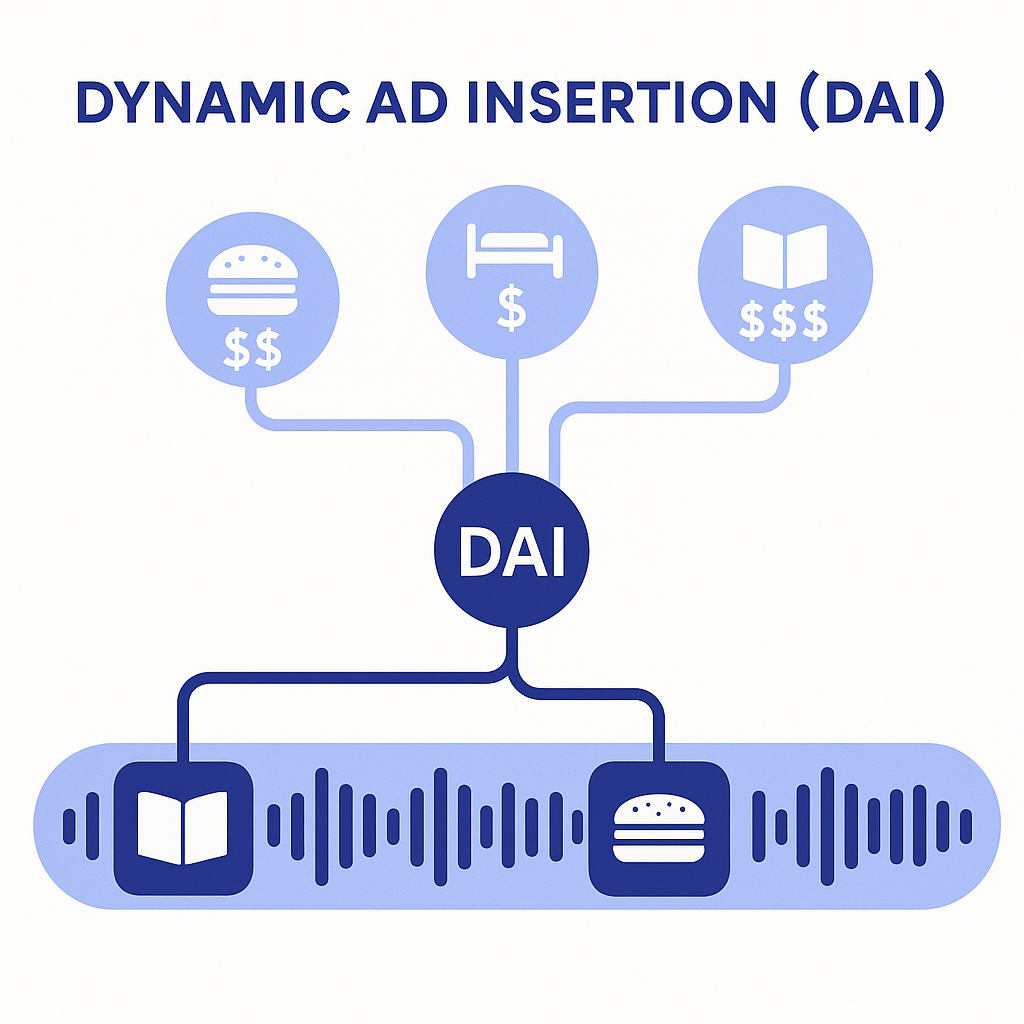
A player can skip a detected segment during playback. A feed service can remove it before your app downloads it. Those approaches reach the audio where a browser filter can’t.
The Spotify Premium surprise
Section titled “The Spotify Premium surprise”Spotify Premium gives you ad-free music, but Spotify’s own support page says Premium listeners can still receive Spotify ads and creator sponsorships on audio podcasts. Eligible video podcasts in select markets play without Spotify ads on Premium, but creator sponsorships can remain.
Premium also doesn’t let you paste a ZeroAds RSS feed into Spotify. To use a clean feed, choose an app that accepts custom RSS URLs.
How to remove ads from Spotify podcasts
Section titled “How to remove ads from Spotify podcasts”- Stay in Spotify and skip. Use the 15-second controls or scrub forward. Spotify is also testing a “Skip ahead” button for some Premium listeners in select markets. It jumps past selected segments in the iOS and Android Now Playing screen; it leaves the audio file intact.
- Subscribe to a creator’s ad-free version. If the show offers one through a Spotify Open Access partner, connect that membership to Spotify. Check that ad-free listening is included in the creator’s offer.
- Use a clean feed in another app. Find the show’s public RSS feed, add it to ZeroAds or a self-hosted remover, and subscribe to the result in Apple Podcasts, Pocket Casts, Overcast, or another RSS app.
For the exact setup, follow how to get rid of ads on Spotify podcasts. For the subscription rules, read does Spotify Premium remove podcast ads?.
Three ways to actually skip podcast ads
Section titled “Three ways to actually skip podcast ads”Method 1: remove the ads from the audio (most effective)
Section titled “Method 1: remove the ads from the audio (most effective)”A clean-feed service processes the episode before you listen. It finds host reads and inserted ads, cuts those segments, then publishes the cleaned audio in a replacement RSS feed.
With ZeroAds, you can keep Apple Podcasts, Overcast, Pocket Casts, Podcast Addict, YouTube Music, or any of the 47+ apps that accept custom RSS URLs. Spotify and Amazon Music don’t accept the clean feed.
- Cuts ads automatically. In our accuracy tests against hand-labeled episodes, ZeroAds catches about 97-98% of ad time, about 85% of every second it cuts lands on labeled ad time, and every cut is listed with timestamps in an episode report you can check.
- 900 hours of ads removed in three weeks, across more than 10,000 processed episodes. A typical episode loses about 4 minutes of ads. We published the full numbers in our August 2026 podcast ad study.
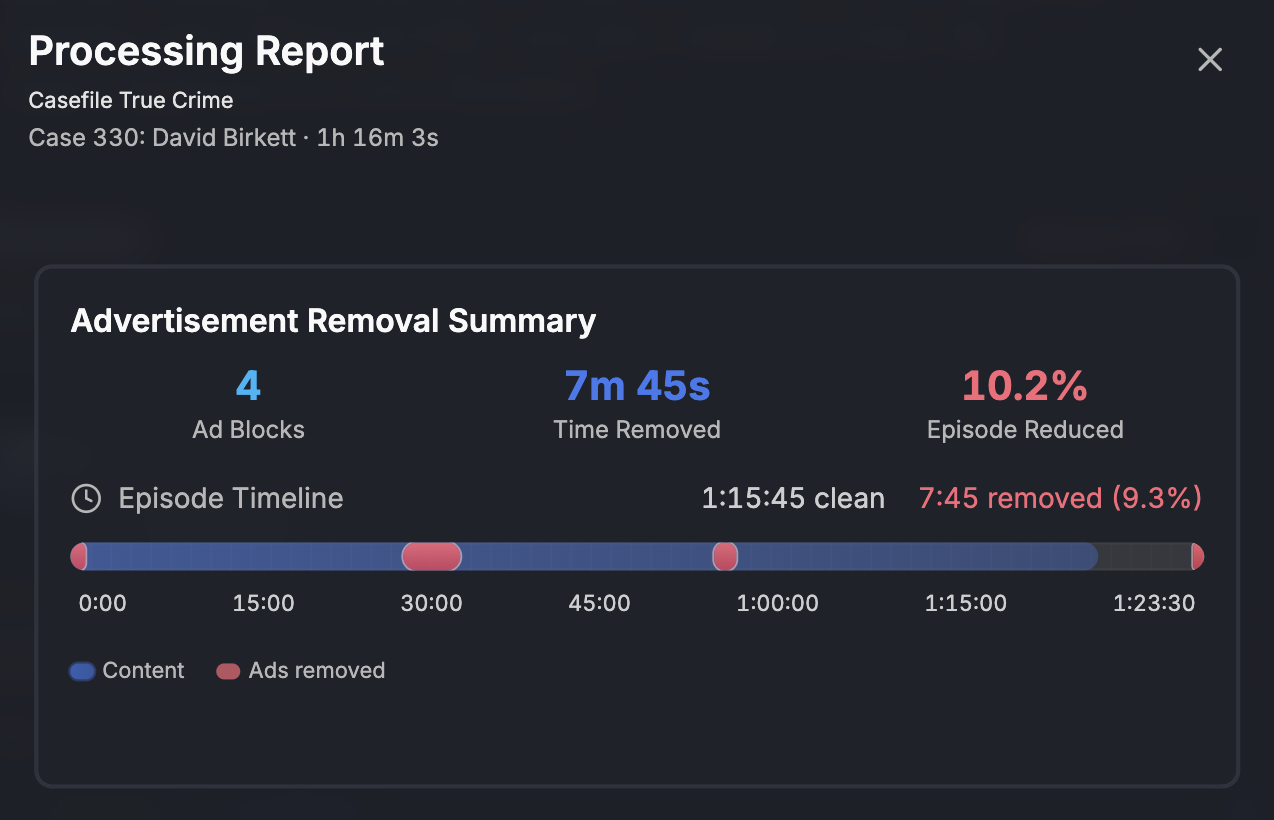
Start with the podcast search on ZeroAds, or browse sample episode reports from a small selection of public shows we’ve already processed. Each report lists the detected cuts with timestamps. Detection can miss ads or cut other audio.
Bring your podcast list with OPML
Section titled “Bring your podcast list with OPML”Already follow a long list of shows? Export an OPML file from your current podcast app, then import it into ZeroAds. Preview the list and choose which podcasts to add; the preview marks shows already in your account. OPML import is available on every plan and follows your plan’s podcast limit.
New episodes are cleaned as they arrive. Importing the list doesn’t request processing for older episodes. Spotify doesn’t export OPML, so add its shows through search or individual RSS links instead.
ZeroAds plans and the free trial
Section titled “ZeroAds plans and the free trial”The founding plan costs $5.99/month forever for the first 500 members; the regular monthly price is $7.99. Annual membership is $60/year. For a bigger library, Power costs $9.99/month for 60 podcasts at once. Get the Power plan.
Your first 5 episodes are free to play in the ZeroAds web app. A paid plan unlocks the clean RSS feed for your podcast app.
Hear the difference first. Try ZeroAds. Your first 5 episodes are free
Method 2: speed controls and skip buttons (the stopgap)
Section titled “Method 2: speed controls and skip buttons (the stopgap)”For a free option in your existing player, use its skip controls. Tap forward when an ad starts, then back if you overshoot.
Overcast’s Smart Speed shortens silences. Pocket Casts’ playback effects include Trim Silence and variable speed. These controls save listening time, but they don’t identify and remove a spoken sponsor message.
Skip buttons help with occasional breaks. For automatic removal in the app you already use, subscribe to a clean RSS feed.
Method 3: creator subscriptions (the expensive route)
Section titled “Method 3: creator subscriptions (the expensive route)”Check the show’s website for an official ad-free edition. A creator subscription supports the show directly and can include extras such as bonus episodes.
- Apple Podcasts subscriptions can cover an individual show or a channel. Pricing and benefits depend on the creator; monthly and annual offers are possible.
- Patreon memberships can include a private RSS feed for your existing podcast app.
- Some creators sell memberships on their own sites or connect them to Spotify through Open Access.
Check the actual offer for “ad-free” before paying. A subscription might instead buy bonus episodes or early access. And a network bundle can cover several shows, so ten podcasts don’t always mean ten separate bills.
For one or two favorite shows, a creator membership can be good value. When your listening spans unrelated publishers, one ZeroAds membership removes ads across your podcast list.
Every option compared (including our competitors)
Section titled “Every option compared (including our competitors)”The important choice is where you want to listen: keep your RSS app, switch players, or run the processing yourself. Prices below are in US dollars, checked November 21, 2026.
| Option | Price | Where you listen | What you set up |
|---|---|---|---|
| ZeroAds | Founding $5.99/mo; regular $7.99/mo; $60/yr; Power $9.99/mo for 60 podcasts at once | Your existing RSS app | Add a podcast, then subscribe to its clean RSS feed; OPML imports a list |
| Herd | US listing: $7.99/mo or $44.99/yr | Herd’s iPhone player; Apple-silicon Mac compatibility listed | Install a replacement player; Mac use is not verified by Apple |
| Podtastic | Smart Features on 2 podcasts free; Unlimited $9.99/mo or $34.99/yr | Its iOS/Android player | Install a replacement player |
| drea | Free | Its iPhone player | Install a replacement player; ad skipping supports English podcasts |
| Podly | Free software; hardware/hosting and optional paid AI services extra | An RSS app | Run the service locally or deploy your own server |
| MinusPod | Free software; hardware/hosting and optional paid AI services extra | An RSS app | Run and maintain a self-hosted server |
| Creator subscriptions | Creator sets the price per show or bundle | The creator’s supported apps or private RSS feed | Subscribe to each offer you want |
| Manual skip / speed controls | Free options available | Your current player | Adjust playback settings and skip the breaks yourself |
Herd detects and skips ads inside its own player. Its current US App Store listing lists $7.99/month and $44.99/year. It’s designed for iPhone; the Mac compatibility entry requires an Apple-silicon Mac, and Apple marks macOS use as unverified.
Podtastic’s pricing page offers Smart Features on two podcasts free, with $34.99/year for Unlimited. Its terms list $9.99/month. Smart Skip uses patterns from what listeners skip. It skips within the player, so you can go back if you want to hear a segment. That’s a useful difference from removing audio before download.
drea is worth a look if you want a free iPhone option. Its developer lists automatic ad skipping, offline downloads, and RSS-by-URL support, with ad skipping limited to English-language shows. You listen in drea; it doesn’t provide a clean feed for another app.
Podly remains an open-source clean-feed option with local and hosted deployment choices, including a Railway template. Its README includes fully local processing as well as paid API configurations, so “you must buy API keys” is too broad. ZeroAds started as a fork of Podly and has since grown into its own system. Podly’s README still lists ZeroAds as a hosted option. Podly vs ZeroAds covers the choice in detail.
MinusPod also serves modified RSS feeds. Its current documentation supports local transcription and local or remote AI services. You supply the computer or server, configure the processing, and maintain it.
What about podcastadblock.app alternatives?
Section titled “What about podcastadblock.app alternatives?”As of this check, podcastadblock.app publishes podcast ad-blocking guides. It doesn’t offer a feed-processing subscription on the current site. Its About page says its author also builds Podtastic. If you arrived looking for an alternative to an older product, choose by the listening experience you want: ZeroAds for your current RSS app, drea or Podtastic for another player, Podly or MinusPod for self-hosting.
Before choosing a service, ask: does it work with your app, does it remove host reads as well as inserted ads, and can you check the cuts? With ZeroAds, you get a clean feed for any RSS app, removal of both kinds of ads, and a timestamped episode report. Keep your podcast app and remove the ads.
What podcast ads actually cost you
Section titled “What podcast ads actually cost you”Magellan AI’s Q3 2025 benchmark measured 8.34% average ad load across 94,724 episodes of popular US podcasts, roughly five minutes per hour. Five minutes of ads per listening hour adds up to 50 minutes over a ten-hour week. Keep that schedule for a year and you’ve spent more than 40 hours listening to ads. That’s a full work week.
Use your own shows to judge the cost: a short sponsor message and a long mid-roll break are different interruptions. Our podcast ads yearly time-cost guide walks through the math.
Escaping Spotify’s walled garden
Section titled “Escaping Spotify’s walled garden”Keep Spotify for music if you like it. You can listen to podcasts in a separate app that accepts clean RSS feeds.
Spotify doesn’t export an OPML podcast list. Add the shows you want through search or their public RSS links, then use the clean versions in your new player. The Spotify migration walkthrough covers that move.
If you’re already in an app that exports OPML, import the list into ZeroAds and choose the shows to add. You can start with one podcast, confirm the clean feed plays in your app, then add the rest.
Does ZeroAds change my podcast app?
Section titled “Does ZeroAds change my podcast app?”No. You subscribe once to a clean RSS feed; your app stays the same.
What about supporting creators?
Section titled “What about supporting creators?”ZeroAds is building a revenue-sharing program for creators. You can also subscribe directly to shows you want to support.
Will it miss some ads?
Section titled “Will it miss some ads?”Occasionally. In our accuracy tests against hand-labeled episodes we catch about 97-98% of ad time; the seconds that slip through you can still skip by hand.
Which podcast apps work with ad-free feeds?
Section titled “Which podcast apps work with ad-free feeds?”Any app that accepts custom RSS feeds: Apple Podcasts, Overcast, Pocket Casts, Podcast Addict, Castro, Downcast, YouTube Music, and other RSS apps. Not Spotify or Amazon Music.
Is there a free podcast ad remover?
Section titled “Is there a free podcast ad remover?”Yes. Your first 5 episodes are free in the ZeroAds web app; a paid plan unlocks clean RSS feeds. For a free replacement player, drea skips ads on English podcasts on iPhone, and Podtastic offers Smart Features on two podcasts free. Podly and MinusPod are free, open-source software you run yourself, with hardware, hosting, and any paid AI services at your expense.
What’s the best podcast ad blocker?
Section titled “What’s the best podcast ad blocker?”Keep your current RSS app: ZeroAds, from $5.99/month at the founding rate. Want a free iPhone player: drea. Want to run your own feed service: Podly or MinusPod. A browser ad blocker cannot remove ads embedded in an audio file.
Using a specific app?
Section titled “Using a specific app?”- Apple Podcasts (iPhone, iPad, Mac)
- Pocket Casts
- Overcast
- Podcast Addict
- Spotify options and the clean-feed setup
Start with a show you love. Try ZeroAds: your first 5 episodes are free in the web app.